
Messaging
Messaging and SMS Consent
Last updated: July 15, 2026
About this page
CuraCara sends SMS only after explicit consent, collected in one of three ways below. Every message includes STOP / HELP language and a way to opt out. No mobile information is ever shared or sold.
Contact: support@curacara.com · Legal: Privacy Policy · Terms & Conditions

Section 1 — Invitation SMS
How consent is collected: Before a coordinator can invite a new caregiver, that caregiver signs a written consent form (a paper or e-signature form) authorizing CuraCara to send an invitation SMS to their phone number. This is the CTIA-defined "prior express written consent."
Message the user receives after signing:
CuraCara: Welcome! Here's your invitation to join our app: https://curacara.com/i/abc123. Message and data rates may apply. Reply STOP to unsubscribe. See our Privacy Policy at https://curacara.com/privacy and Terms & Conditions at https://curacara.com/terms.
Section 2 — Sign-in verification codes
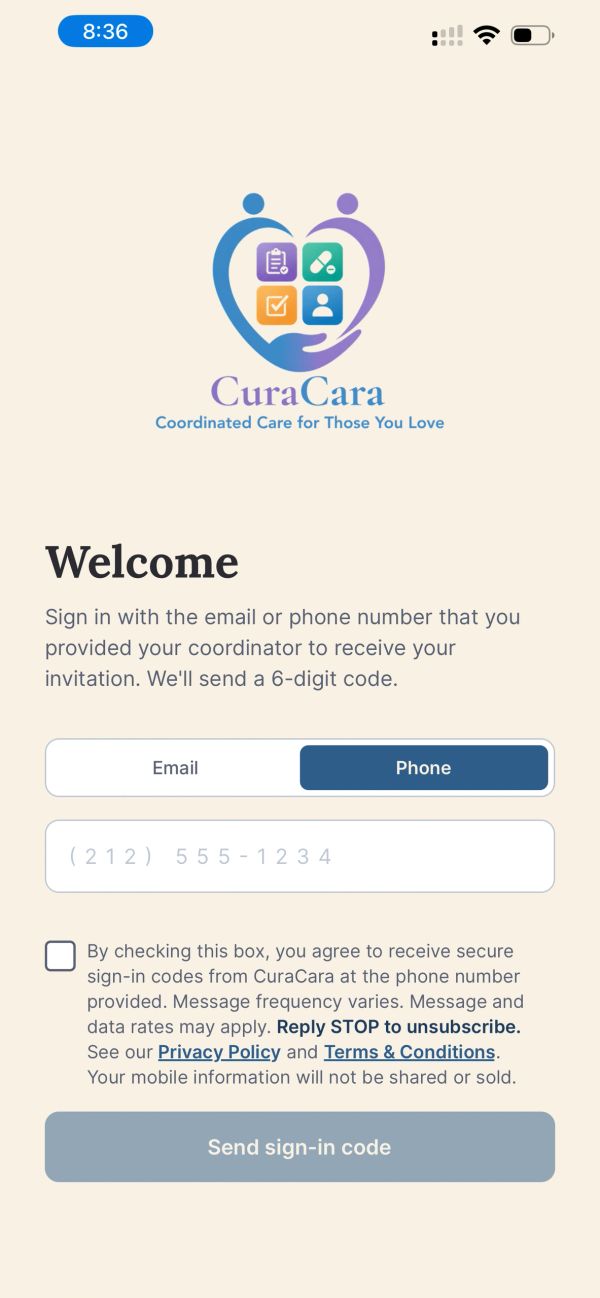
How consent is collected: After the user taps the invitation link (or opens the app directly), they see the Welcome / Sign-in screen. They enter their phone number and see an SMS-consent checkbox with the full CTIA-compliant language. If they picked Phone, they must check the box before the "Send sign-in code" button is enabled. Email sign-in does not send any SMS, so the box stays optional in that flow.
Exact checkbox language shown to the user:
By checking this box, you agree to receive secure sign-in codes from CuraCara at the phone number provided. Message frequency varies. Message and data rates may apply. Reply STOP to unsubscribe. See our Privacy Policy at https://curacara.com/privacy and Terms & Conditions at https://curacara.com/terms. Your mobile information will not be shared or sold.
Message the user receives:
CuraCara: Your secure sign-in code is 123456. Enter this code to complete your sign-in. If you did not request this, please ignore this message. Reply Stop to unsubscribe from future messages.
Section 3 — Care alerts & notifications
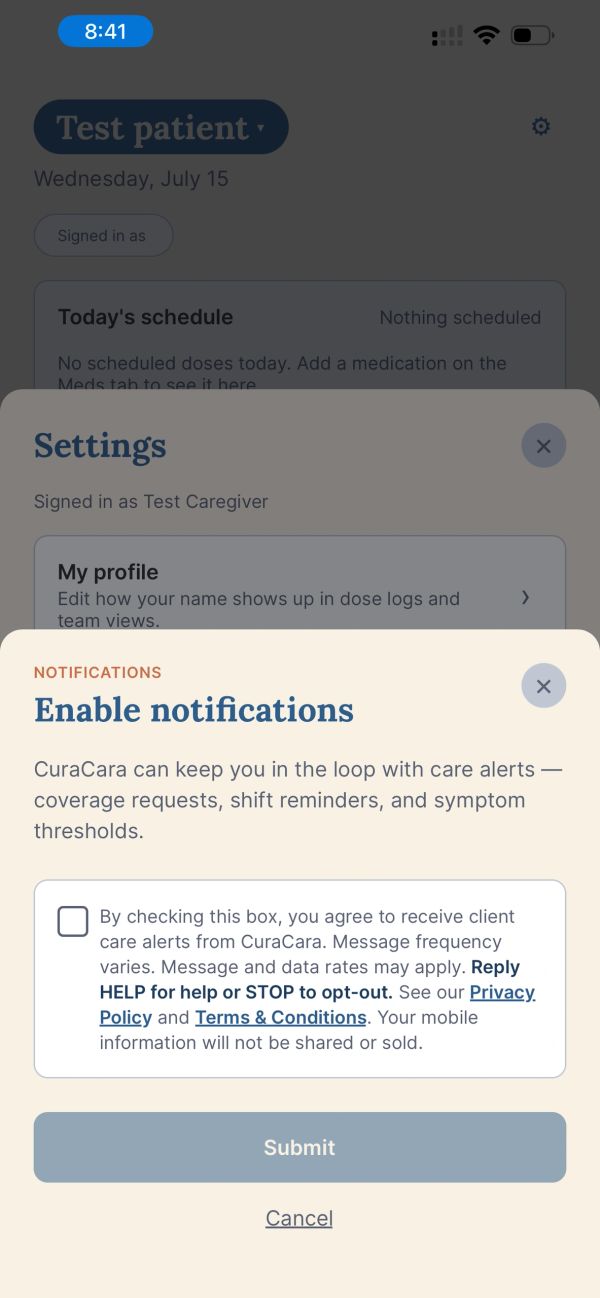
How consent is collected: Once the user is signed in, they can opt into ongoing care notifications (coverage requests, shift reminders, symptom threshold alerts) by opening the Notifications screen and checking a dedicated consent box. Submit persists their consent and triggers an immediate confirmation SMS. Unchecking the box (or leaving it unchecked) means no ongoing SMS is sent.
Exact checkbox language shown to the user:
By checking this box, you agree to receive client care alerts from CuraCara. Message frequency varies. Message and data rates may apply. Reply HELP for help or STOP to opt-out. See our Privacy Policy at https://curacara.com/privacy and Terms & Conditions at https://curacara.com/terms. Your mobile information will not be shared or sold.
Confirmation SMS sent immediately after opt-in:
CuraCara: You are opted in to care alerts (coverage requests, shift reminders, symptom thresholds). Msg freq varies. Msg & data rates may apply. Reply HELP for help, STOP to opt-out.
Example ongoing care alert:
CuraCara alert: Blood pressure reading 180/95 for Mom is above the alert threshold. Open the app to review. Reply STOP to opt out.